
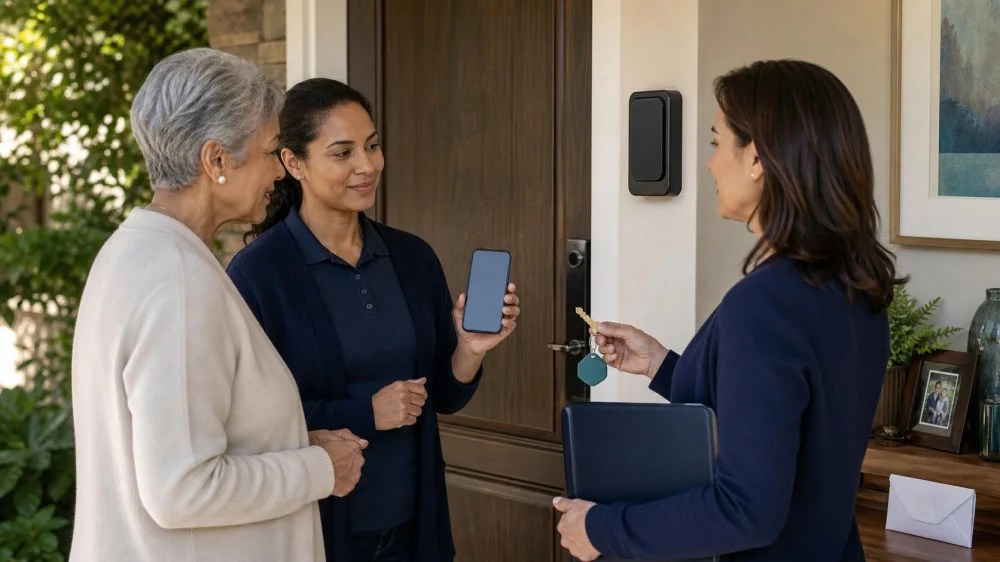
Home Care Keys, Lockboxes, and Access Codes: A Security Guide
On this page
- Quick answer
- Define who needs access
- Choose the least complex method
- Manage physical keys
- Use a lockbox carefully
- Manage smart locks and codes
- Limit sensitive information
- Create an arrival and departure routine
- Handle staffing changes
- Plan for lock or power failure
- Respond to lost access or suspected misuse
- Audit access regularly
- Access checklist
- Frequently asked questions
- Next steps
Quick answer
Create a written list of who is authorized to enter the home, during which hours, for what purpose, and by which method. Use the simplest secure option that fits the care recipient’s abilities, home layout, emergency plan, agency policy, lease or building rules, and local requirements.
Never place an address, name, diagnosis, or schedule on a key or lockbox. Do not share one permanent code with every worker. Keep a private issuance log, provide unique or time-limited codes when supported, change access promptly after staffing changes, and test a backup entry method. A lockbox or smart lock should not replace consent, visit verification, fire safety, or a plan for someone who cannot answer the door.
24 Hour Home Care
El SegundoLos Angeles CountyCalifornia
200 N Pacific Coast Hwy Suite 300, El Segundo, CA 90245, USA
Define who needs access
List family caregivers, agency workers, private aides, nurses, therapists, cleaners, meal services, building staff, emergency contacts, and other authorized visitors. Not everyone needs an unsupervised key or code.
For each person or role, record permitted days and hours, whether entry is independent or announced, which doors may be used, and who approves changes. Keep this list private.
Confirm the care recipient’s consent and decision-making arrangements. A family member should not distribute access merely for convenience when authority is unclear.
Ask agencies how they screen workers, assign substitutes, identify staff, record visits, and recover keys. Individual contractors may require a different written agreement.
Amada Senior Care
GlendaleLos Angeles CountyCalifornia
520 E Wilson Ave Suite 105, Glendale, CA 91206, USA
Choose the least complex method
A household member opening the door provides direct control but may not work when mobility, hearing, sleep, or cognition limits response. A physical key is simple but difficult to revoke without recovery or rekeying.
A mechanical lockbox avoids copying keys but usually uses a shared combination. An electronic lockbox can create temporary access or records, depending on design and service.
A smart lock may offer individual codes, schedules, remote control, and event logs. It also introduces batteries, connectivity, software, accounts, and privacy considerations.
Building concierge or key-control services may work in apartments. Confirm written rules, after-hours access, identity checks, and emergency procedures.
Choose a method the household can manage consistently. More features do not automatically create better security.
Manage physical keys
Number keys in a private log rather than labeling them with the address or occupant. Record who received each key, date issued, purpose, and date returned.
Do not hide keys under mats, planters, mailboxes, or decorative objects. Familiar hiding places are not controlled access.
Ask whether duplication is permitted and how keys must be stored during a shift. A worker should not attach an identifying address or care information.
Recover keys promptly when service ends. If a key is lost or not returned, assess rekeying with the owner, landlord, locksmith, agency, and insurance requirements as appropriate.
Use a lockbox carefully
Select a device suited to the door, climate, mounting surface, key size, and user needs. Follow manufacturer instructions. Improvised boxes and lightweight containers may not protect access.
Mount the lockbox where authorized workers can reach it safely but casual visitors cannot easily observe code entry. Do not obstruct the door, handrail, meter, alarm, or accessible route.
Use a code that is not an address, birth date, phone number, apartment number, or simple sequence. Shield the keypad and scramble dials after closing.
Confirm that the key is returned immediately after opening and that the box is fully closed. A key left in the door or a box left open defeats the system.
Mechanical boxes do not identify who entered. Pair the device with scheduled visits, arrival confirmation, and an incident process.
Manage smart locks and codes
Create a separate code for each authorized person or role when the system permits. Time-limit temporary workers and disable codes as soon as access ends.
Use a strong unique account password and available multi-factor authentication. Limit administrative access; a visitor who needs to unlock the door may not need permission to add users or view every event.
Check battery level, physical key backup, connectivity behavior, time zone, schedules, and notifications. Test what happens when internet service fails or the phone is unavailable.
Review the manufacturer’s privacy and support practices before installation. Event logs can reveal when a vulnerable person is home, when workers visit, and when the home is empty.
Install and maintain the lock according to door, fire, lease, insurance, and accessibility requirements. A qualified locksmith or building professional may be needed.
Limit sensitive information
Share access details only through the approved channel. Avoid group texts that include former workers, public calendars, unencrypted notes at the door, or voicemail containing a full code and address together.
Do not store diagnoses, medication lists, finances, or daily routines in the same note as the entry code. Separate what a worker needs to enter from what they need to provide care.
Doorbell cameras and access logs may record workers, visitors, and care patterns. Tell people about monitoring as required by policy and applicable law, and limit who can view recordings.
Delete or archive access records according to the household or agency plan. Keeping every log forever can create unnecessary exposure.
Create an arrival and departure routine
The caregiver should verify the address privately, identify themselves, and use the approved entrance. A call or message before entry can reduce surprise and help secure pets.
After entering, relock the door and return any key to its controlled location. Do not leave a door propped open while carrying supplies.
Confirm that the care recipient is safe and that entry conditions match the plan. Unexpected damage, an open door, or an unknown person may require the worker to stay outside and contact a supervisor or emergency service.
At departure, check doors and windows assigned in the plan, return the key, scramble the lockbox, and record visit completion without exposing private details.
Handle staffing changes
Agencies may send substitutes. Decide who informs the household, how the substitute is identified, and whether a temporary code or supervised entry is used.
Do not share a regular worker’s personal code with a substitute. Individual credentials preserve accountability and are easier to revoke.
When a worker leaves, recover physical keys, disable codes, remove app access, update alarm contacts, and check whether copies or saved credentials exist.
Record changes in the private access log. Tell the care recipient and active caregivers which method is current so old instructions are not reused.
Plan for lock or power failure
Test backup entry before it is needed. Options may include a controlled physical key, building staff, authorized nearby contact, locksmith process, or emergency-service entry.
Replace batteries on a documented schedule and respond to low-battery warnings. Store the backup key separately from the lockbox or smart device.
Consider how severe weather, power outages, frozen locks, phone loss, internet failure, and fire alarms affect entry and exit. Doors must still meet emergency egress requirements.
Do not disable or modify a lock in a way that traps the occupant. Consult a locksmith, fire-safety professional, landlord, or building authority for complex needs.
Respond to lost access or suspected misuse
If a key, phone, code, or device is lost, notify the authorized decision-maker and agency immediately. Disable the credential and assess rekeying or code changes.
Preserve relevant logs, messages, and camera records without sharing them broadly. Write down dates, times, people involved, and actions taken.
For suspected unauthorized entry, prioritize the occupant’s safety. Do not confront an unknown person. Contact building security or emergency services when appropriate.
Change access after the immediate issue, then review how the credential was exposed. Update training and communication rather than relying only on a new code.
Audit access regularly
At a set interval, compare active keys, codes, app users, lockbox combinations, alarm contacts, and building lists with current caregivers and services.
Test doors, batteries, backup keys, lockbox operation, and visit notifications. Confirm that the care recipient can exit safely.
Remove access that is no longer needed. “Just in case” credentials accumulate and make incidents harder to investigate.
Review after hospitalization, move, staff turnover, family conflict, device replacement, or a change in decision-making authority.
Access checklist
- List authorized people, hours, purpose, and entry method.
- Confirm consent, agency policy, lease, and building rules.
- Use unmarked keys and a private issuance log.
- Avoid obvious lockbox codes and public hiding places.
- Create unique, time-limited smart-lock codes where supported.
- Separate access details from health and schedule information.
- Relock doors and return keys after every entry.
- Disable credentials immediately after service ends.
- Test batteries, outages, and backup entry.
- Audit all active access regularly.
Frequently asked questions
Is a lockbox safer than giving caregivers keys?
Each has tradeoffs. A lockbox can reduce copied keys but may use a shared code; a key is simple but harder to revoke. Choose based on risk, policy, device quality, and management.
Should every caregiver use the same code?
Unique credentials are preferable when the system supports them. Shared codes make it difficult to know who entered and require wider changes after one person leaves.
Can I put the address on a spare key?
No. Use a private key number or code in a separate secure log. A lost key should not identify the home.
What if the person receiving care cannot answer the door?
Create an authorized-entry plan with consent, identification, visit confirmation, emergency contacts, and backup access. Entry technology alone does not establish permission.
Are smart-lock logs private?
They can reveal household routines. Review account access, retention, notifications, manufacturer practices, agency policy, and applicable privacy rules.
Next steps
List every active key and code, remove outdated access, and choose one authorized person to maintain the private log. Test the primary and backup entry methods with the home-care provider. Document the arrival routine, staffing-change process, and response to a lost credential.
This guide provides general security planning, not legal advice. Consent, tenancy, fire safety, privacy, accessibility, insurance, and care-agency rules vary by home and location.






 BrightStar Care5.0 (7 reviews)
 A+ Homecare Services Inc.5.0 (2 reviews)
 Angeleno Home Health Care5.0 (2 reviews)
 Century City Concierge Nursing5.0 (5 reviews)
 Better You Home Care5.0 (14 reviews)
 1 South Bay In Home Senior Care5.0 (1 reviews)
 The Role of Technology in Enhancing Senior Care
 Legal Rights and Protections for Family Caregivers: Know Your Rights and Benefits
 Emerging Trends in Senior Health Care
 How to Encourage Seniors to Take Part in Light Household Chores Safely
 Strategies for Maintaining Independence While Providing Necessary Support
 Exploring Long-Term Care Insurance Options for Seniors